
- Blogs
- Software Development
- Shopify B2B Wholesale: Complete Setup Guide, Features & How It Works
Shopify B2B Wholesale: Complete Setup Guide, Features & How It Works
- Published: September 14, 2026

Written By : Sualeha
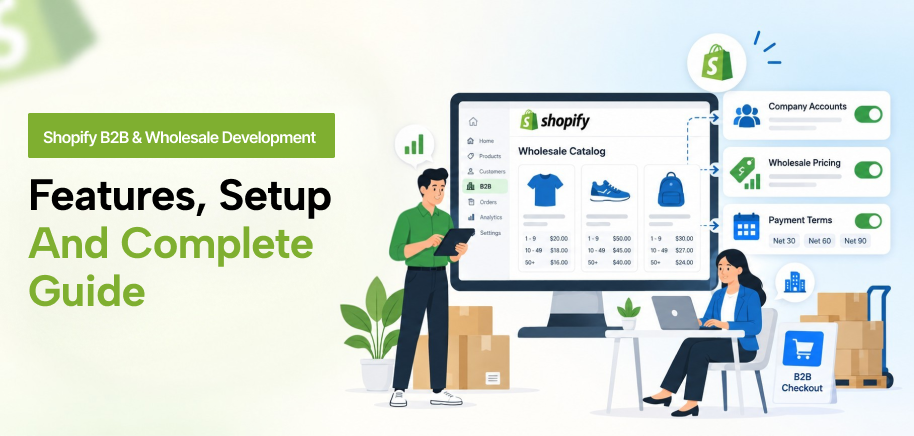
Shopify B2B wholesale gives merchants built-in tools for selling to business customers with wholesale pricing, product-specific purchasing rules, payment terms, and controlled buyer access.
Instead of treating wholesale buyers like standard retail customers, B2B on Shopify organizes them through companies and company locations.
B2B catalogs determine which products buyers can access and what prices they receive, while customer accounts connect authorized buyers to the right purchasing conditions.
A successful Shopify B2B setup starts with the business model itself. Merchants need to define customer relationships, pricing structures, order quantities, payment terms, and buyer permissions before configuring the store.
This guide covers Shopify B2B features, setup, pricing, plan requirements, and the situations where custom development may be required.
How Does Shopify B2B Work?
Shopify B2B organizes wholesale customers through companies, locations, and individual buyers. Each company location can have its own product access, pricing, payment terms, and ordering rules.
Merchants can create B2B catalogs to decide which products a buyer can purchase and what wholesale pricing applies. They can set minimum or maximum order quantities, create quantity increments, and offer volume pricing for larger purchases.
Payment terms can be set based on the buyer’s account. Some customers can pay at checkout, whereas approved business accounts can purchase using net payment terms.
The Shopify B2B structure looks like this:
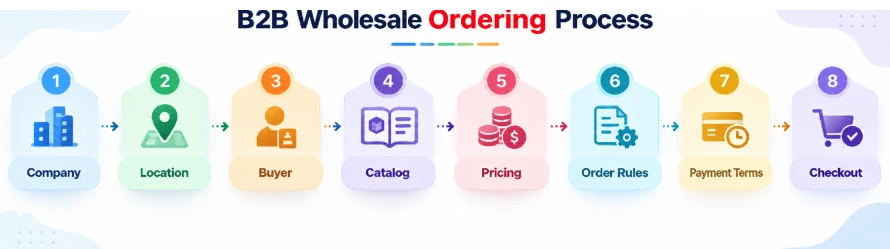
This structure allows merchants to manage different wholesale customers without applying the same pricing and purchasing conditions to every buyer.
Shopify B2B vs Shopify Wholesale: What Is the Difference?
Shopify B2B and Shopify wholesale are related, but they are not the same. Shopify wholesale refers to selling products to other businesses, while Shopify B2B provides native tools for managing business buyers.
With Shopify B2B, merchants can manage company accounts, B2B catalogs, wholesale pricing, volume pricing, quantity rules, and net payment terms.
A simple wholesale setup may work for basic pricing and orders. Businesses with multiple locations, buyer permissions, or different pricing structures may need a more structured Shopify B2B setup.
Key Shopify B2B Features for Wholesale Selling
Shopify B2B features cover the main parts of a wholesale purchasing process, from organizing business customers to controlling products, prices, quantities, and payment conditions.
Company Accounts and Locations
Company accounts organize business customers separately from retail customers. Each company can have multiple locations for branches, offices, stores, or other purchasing entities.
Locations can have different contacts, addresses, pricing, payment terms, and purchasing settings, making them useful when one customer operates under different buying arrangements.
B2B Catalogs
B2B catalogs determine which products business customers can access and the prices they receive. Different catalogs can be assigned where customer groups have different assortments or pricing structures.
Catalogs should reflect meaningful commercial differences rather than creating separate catalogs for minor variations that can make management harder.
Wholesale Pricing
Shopify wholesale pricing can use percentage-based price adjustments or fixed product prices. Percentage adjustments suit groups following the same pricing model, while fixed prices work better for negotiated product rates.
The pricing structure should match actual customer agreements without creating unnecessary catalog or pricing variations.
Quantity Rules and Volume Pricing
Quantity rules define minimums, maximums, and ordering increments. For example, a product packed in cases of 12 can be restricted to valid case quantities.
Volume pricing serves a different purpose by lowering the unit price at defined quantity thresholds. Quantity rules control how much buyers can order, while volume pricing controls what they pay at different quantities.
Net Payment Terms
Net payment terms allow eligible B2B customers to place orders without paying immediately at checkout. Payment can instead follow the schedule agreed with the customer.
Different company locations can have different payment conditions, allowing approved accounts to receive credit terms while others pay immediately.
Customer Accounts and Buyer Permissions
Customer accounts connect individual buyers with the company locations they are authorized to purchase for.
Buyer access should match purchasing responsibilities so each contact sees the correct products, pricing, orders, and company locations.
How to Set Up Shopify B2B Wholesale
A Shopify B2B setup should reflect how the business manages customers, pricing, orders, and payments rather than forcing every buyer into the same wholesale structure.
1. Map Your Wholesale Customer Structure
Identify customer companies, purchasing locations, authorized buyers, pricing groups, and payment arrangements before configuring Shopify.
2. Review Shopify Plan Requirements
Check which Shopify plan supports the B2B features, catalog structure, pricing requirements, payment options, and storefront model your business needs.
3. Create Companies and Company Locations
Create company accounts for customer organizations and use company locations for branches or purchasing entities that require separate settings.
4. Assign Buyers and Permissions
Connect buyers to the locations they purchase for and review whether each contact requires access to one or multiple locations.
5. Configure B2B Catalogs
Create catalogs around genuine differences in product access and wholesale pricing. Customer groups with the same assortment and pricing structure can share a catalog.
6. Set Wholesale Pricing
Apply percentage adjustments or fixed prices based on customer agreements. Keep customer-specific pricing separate only where a distinct commercial agreement requires it.
7. Add Quantity Rules and Volume Pricing
Set minimums, maximums, and increments for products with ordering restrictions, then apply volume pricing where larger quantities qualify for lower unit prices.
8. Configure Payment Terms
Decide which customers pay at checkout and which qualify for net payment terms based on their existing credit arrangements.
9. Review Integrations and Order Requirements
Identify whether B2B orders need ERP synchronization, inventory updates, accounting data, approvals, or fulfillment workflows outside Shopify.
10. Test the B2B Buying Process
Test buyer access, product visibility, wholesale pricing, quantity rules, payment terms, shipping, checkout, and connected systems across different customer scenarios.
Set up wholesale pricing, buyer accounts and bulk orders with SolCoders
Common Shopify B2B Setup Mistakes
A Shopify wholesale setup can work technically but still cause problems when catalogs, pricing, company accounts, and ordering rules do not match the actual wholesale process.
Creating Too Many B2B Catalogs
Creating a separate catalog for every customer makes pricing harder to manage. Group customers with the same products and pricing rules, and use separate catalogs only when different terms are required.
Applying the Same Rules to Every Location
Company locations may have different buyers, prices, payment terms, shipping addresses, or purchasing requirements. Configure each location according to how it places and manages orders.
Mixing Quantity Rules With Pricing Logic
Quantity rules control minimum quantities and order increments, while volume pricing applies price breaks based on order quantity. Keep these settings separate to avoid incorrect ordering or pricing.
Configuring Before Mapping the Wholesale Process
Setting up catalogs and pricing before defining company accounts, buyer access, payment terms, and purchasing requirements can create unnecessary rework. Map the wholesale process before configuring Shopify.
Testing With Only One Buyer Type
A successful test order does not confirm that every B2B scenario works correctly. Test different catalogs, company locations, pricing structures, quantity rules, and payment terms before launch.
When Does Shopify B2B Need Custom Development?
Shopify B2B covers many common wholesale needs, including company accounts, catalogs, pricing, quantity rules, and payment terms. Custom development is needed when your B2B process requires features or rules Shopify’s standard settings can’t handle.
Custom Pricing and Ordering Rules
Some businesses have pricing, discount, payment, delivery, or order rules that are more specific than Shopify’s standard B2B options.
Where Shopify supports it, use custom business logic with Shopify Functions to apply these rules within the purchasing process.
ERP and Business System Integrations
Wholesale businesses often need Shopify to connect with ERP, accounting, inventory, warehouse, or fulfillment systems.
Custom integrations can keep customer details, pricing, inventory, and order data connected across Shopify and the systems used to manage B2B operations.
Custom Checkout Requirements
Some B2B stores need checkout rules or options that are not available in the standard purchasing flow.
Modern Shopify customization can add supported checkout functionality for specific payment, delivery, validation, or order requirements.
Custom development makes sense when there is a clear B2B requirement that Shopify’s standard features cannot handle.
SolCoders can help reduce buying friction for your business customers.
Is Shopify B2B Right for Your Wholesale Business?
Shopify B2B is a practical option for businesses that need to manage company accounts, multiple purchasing locations, wholesale pricing, product access, order quantities, and payment terms within Shopify.
Before choosing a setup, map a typical B2B order from buyer login to fulfillment. If standard Shopify B2B features can represent that process, native configuration may cover most requirements.
More specialized pricing logic, approvals, integrations, or checkout requirements may require custom development.
SolCoders combines innovation and technology to deliver scalable, high-performance software solutions that streamline operations and accelerate digital transformation.
In This Article
Frequently Asked Questions:
What Is Shopify Wholesale?
Shopify wholesale means using Shopify to sell products to other businesses with trade pricing, bulk-order rules, business accounts, or customer-specific payment conditions. Merchants can use native Shopify B2B features, apps, or custom functionality.
What Is the Shopify B2B Wholesale Channel?
Shopify B2B is Shopify’s native system for business selling. It connects company accounts and buyers with B2B catalogs, wholesale pricing, ordering rules, payment terms, and customer accounts.
What B2B Features Does Shopify Have?
Shopify B2B features include company accounts and locations, B2B catalogs, wholesale pricing, quantity rules, volume pricing, net payment terms, customer accounts, and buyer access controls. Available capabilities and limits depend on the Shopify plan.
How SolCoders Sets Up B2B Wholesale on Shopify
SolCoders sets up Shopify B2B with company accounts, buyer access, wholesale pricing, B2B catalogs, quantity rules, and payment terms based on how your business sells to wholesale customers.
Is Shopify B2B the Same as Shopify Wholesale?
No. Shopify B2B is Shopify’s native feature set for structured business selling, while Shopify wholesale is the broader practice of selling products to business customers through native features, apps, or custom solutions.
Related Blogs
Latest Blogs
Shopify Functions Guide: Custom Discounts, Delivery and Payment Rules
Blogs E-commerce Development Shopify Functions Guide: Custom Discounts, Delivery and Payment Rules Shopify Functions Guide:…

Enterprise Application Integration: How it Transform Businesses
Blogs Software Development Enterprise Application Integration: How It Transforms Businesses Enterprise Application Integration: How It…

Enterprise Software Development: Complete Guide for 2026
Blogs Software Development Enterprise Software Development: Complete Guide for 2026 Enterprise Software Development: Complete Guide…