Tabular: Product in Table View – Shopify Product Table App
Make Product Browsing Faster with a Sortable Shopify Product Table
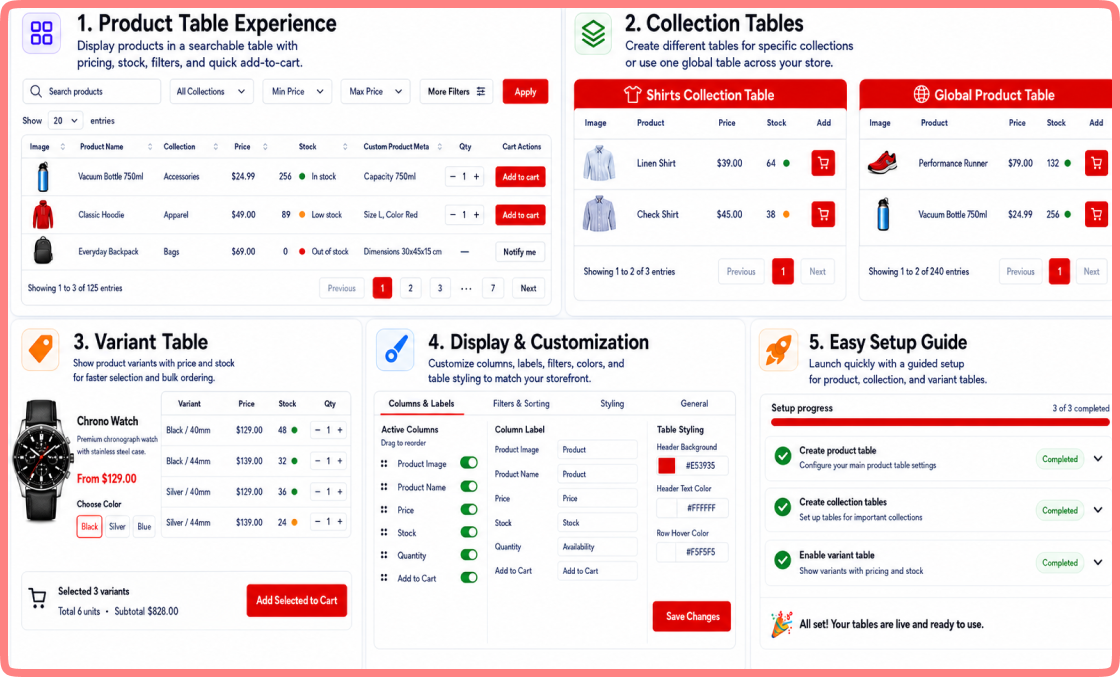
Tabular: Product in Table View replaces the default collection grid with a customizable Shopify product table. Customers can search, filter, compare, select variants, and add products to their cart from one organized view.The responsive table makes browsing large product catalogs easier on desktop and mobile, helping customers find the right products with fewer clicks.
Traditional product grids work well for visual browsing. A Shopify product table is more suitable when customers need to compare specifications, review multiple products, or place a larger order.
Why Choose Tabular
Feature
Search
Sorting
Filtering
Variant selection
Quantity entry
Add to Cart
Specifications
Custom columns
Large-order workflow
Mobile display
Default Product Grid
Depends on the theme
Limited preset options
Basic collection filters
Commonly requires a product page
Often handled on separate pages
Usually one product at a time
Limited visible information
Controlled by the theme
Requires several page visits
Varies by theme
Tabular Product Table
Built-in table search
Sortable columns
Product, collection, and price filters
Available within each row
Included in the table
Quick ordering from each row
Dedicated metafield columns
Configurable from the app
Multiple items selected from one view
Responsive table layout
Smart Features for Smooth Product Purchasing
Full delivery scheduling control for ecommerce brands. No technical setup needed.
Core Features
Bulk Ordering Made Easy
Let customers add multiple products to their cart through a Shopify product listing table. Each row includes a quantity field and an Add to Cart button, helping B2B and repeat buyers prepare larger orders with fewer steps.
Wholesale Ordering
Wholesale and bulk customers need speed and efficiency. Tabular provides an Advanced Product Table for Shopify where users can scan inventory levels, check variant availability, and complete bulk ordering quickly. No page loads between selections, and no unnecessary navigation.
Variant Selection
Display product variants such as size, color, and material within the table. Customers can select the required option from the relevant row and review its price and availability before adding the product to their cart.
Search, Filter, and Sort Products
Help customers find relevant items through live search, product and collection filters, price filters, and sortable columns. These controls make extensive catalogs easier to browse without moving through multiple pages.
Customize the Table Layout
Adjust column names, product image sizes, description length, colors, pagination, and the number of products shown. You can hide unnecessary columns or exclude selected products and collections through the app settings.
Display Shopify Product
Metafields
Show custom product details such as dimensions, materials, model numbers, manufacturers, and pack sizes in dedicated columns. This allows customers to compare specifications and choose the correct product without opening separate product pages.
Benefits for Different Types of Shopify Stores
Benefits
01
B2B and wholesale stores
Help buyers compare products, select variants, enter quantities, and place repeat or bulk orders from one table.
02
Retail stores with large catalogs
Let shoppers search, filter, and sort large product catalogs while comparing prices, variants, and availability.
03
Dropshipping stores
Display supplier SKUs, prices, product options, and inventory details in a clear, organized table.
04
Catalog-heavy stores
Help customers compare specification-based products by presenting custom metafield data, such as dimensions and model numbers, in sortable columns.
How It Works
How Our Shopify App Works
Tabular connects with your existing Shopify products and collections. You do not need to create duplicate products or manage a separate inventory.
Step-01:
Step-02:
Step-03:
Step-04:
Step-05:
Step-06:
Install Tabular
Install Tabular from the Shopify App Store.
Select Products or Collections
Select the products or collections you want to display.
Choose Table Columns
Choose your table columns, such as product name, image, SKU, price, stock status, variants, and custom product meta.
Customize Table Layout
Customize the table layout to match your storefront.
Add Table to Store Page
Add the product table to the required store page through the available theme integration.
Publish Your Product Table
Publish a searchable and sortable table where customers can review products and add items to their cart.
Pricing
Transparent Pricing
Choose the plan that works best for your business and get a 14-day free trial of our Tabular: Products In Table View app. Make product browsing faster and ordering easier.
Development Plan
Free
Test Tabular on your Shopify development store before launch.
Features include:
Available for Shopify Development Stores
Access to all core features
No charges until your store goes live
Simple Shopify setup and integration
Standard Plan
$8.99/month
Product table view, filtering, sorting, and one-click ordering for Shopify stores.
Suitable for wholesale businesses, specification-based products, and stores managing larger catalogs.
Features include:
Collection-specific tables
Variant tables on product pages
Custom metafield columns
More layout controls
Support for bulk-order workflows
Features for extensive product catalogs
Performance & Compatibility
Tabular is optimized for all standard Shopify themes. The responsive product table does not slow down your store or add render-blocking scripts. It loads product data efficiently even for large catalogs and works smoothly on mobile devices.
Trusted by Many
Why Shopify Store Owners Trust Us
This app does everything we need. We were able to get rid of one other App on our store, reducing our monthly cost. I had contacted the developers asking some questions, within a few hours, they rolled out a new release allowing me to do what I was asking. Working with them on a special feature for the app, and not only was their price VERY reasonable, the feature was released within 24 hours. Within only 72 hours, they had released 3 new features my store. Don’t hesitate to contact them, they respond very quickly.
Great application! It is exactly what we were looking for.
Happy Buyer
MerrilSoft
Our Achievements
Verified Excellence Across Trusted
Marketplaces
We Build Powerful Digital Products That Fit Your Business
Shopify App
Noon Reviews Importer
Convert existing Noon social proof into a powerful sales-driving asset for your Shopify store.
A Shopify product table displays products in organized rows and columns. Customers can compare product names, images, SKUs, prices, variants, stock availability, and quantities from one page.
How do I add a product table to my Shopify store?
Install Tabular: Product in Table View from the Shopify App Store. Select your products or collections, configure the table columns, and add the table to the required store page using the available app block.
Can I use Tabular for wholesale and bulk ordering?
Yes. Tabular allows wholesale buyers to view products, select variants, enter quantities, and add multiple items to their cart from one product table.
Can customers select product variants from the table?
Absolutely, customers can select available options such as size, color, or pack quantity, enter the required quantity, and add the chosen variant directly to their cart
Does Tabular work with Shopify collections?
Yes. You can display products from selected Shopify collections in separate tables, making it easier to create category-specific catalogs and order forms.
Is the Shopify product table mobile-friendly?
Yes. The responsive product table adapts to desktop, tablet, and mobile screens, helping customers browse and order products on any device
Turn Product Browsing into smooth Ordering
Help customers compare products, select variants, and add multiple items to their cart from one clear table.