
- Blogs
- Software Development
- Enterprise Application Integration: How It Transforms Businesses
Enterprise Application Integration: How It Transforms Businesses
- Published: August 10, 2026

Written By : Sualeha
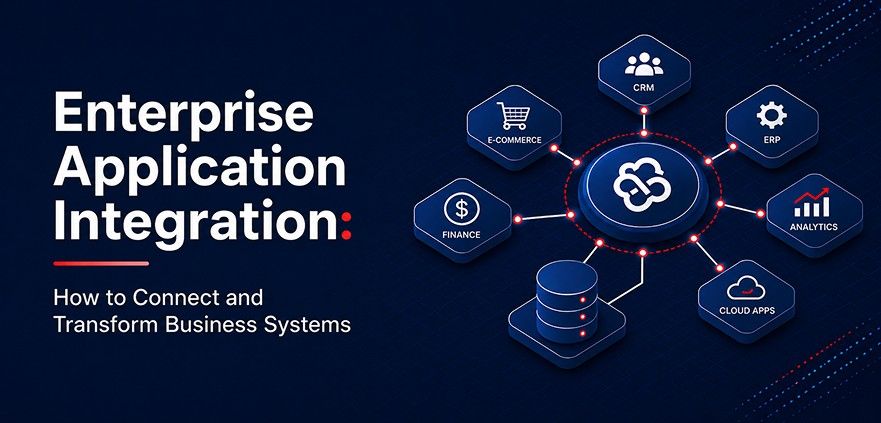
Enterprise application integration (EAI) connects business systems such as CRM, ERP, ecommerce, finance, HR, inventory, and customer service platforms. It allows these applications to share data and support connected business processes.
EAI helps data, transactions, and workflows move between systems automatically and reliably. This reduces manual data entry, mismatched records, and disconnected processes across departments.
A strong enterprise integration strategy can connect cloud platforms, enterprise software, and legacy systems without replacing the entire technology setup.
This guide explains how EAI works, the main integration approaches, and how APIs, ESB, and iPaaS fit into enterprise integration.
What Is Enterprise Application Integration?
Enterprise application integration is the process of linking business applications so they can exchange data, trigger actions, and coordinate processes without repeated manual intervention.
EAI may use APIs, connectors, integration middleware, message queues, data transformation, orchestration, and related technologies to manage communication between platforms.
For example, a CRM may exchange customer data with an ERP, an ecommerce platform may update inventory and fulfillment tools, or an HR application may pass approved employee changes to payroll.
EAI defines what data needs to be shared, when it should move between systems, how it should be transformed, and how integration failures should be handled.
How Does Enterprise Application Integration Work?
EAI flow looks like this:
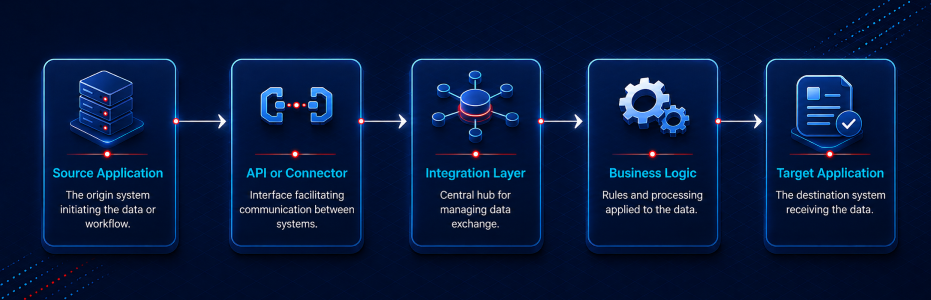
The source application creates data, such as an order or customer record. An API or connector sends it to the integration layer, where it is validated, formatted, and routed based on business rules.
For example, EAI can send an ecommerce order to the ERP, update inventory, trigger fulfillment, and sync the CRM. If a system is unavailable, it can hold the data, retry later, and log the error without losing the transaction.
Why Do Businesses Need EAI?
Disconnected software can cause problems across sales, finance, support, ecommerce, and other teams. When systems do not share data properly, departments may work with outdated or inconsistent information.
For example, sales may update a CRM record while finance still sees old ERP data, or an online store may show stock that is no longer available. Support teams may also need to check several tools to understand a customer’s history.
Common issues include duplicate data entry, conflicting records, delayed updates, manual work, reporting delays, and limited visibility.
Enterprise application integration helps reduce these gaps by allowing connected systems to exchange data through defined rules.
Key Components of Enterprise Application Integration
Enterprise application integration combines different technologies to connect systems and manage data flow based on application needs, platform capabilities, and infrastructure.
Integration Middleware
Integration middleware connects enterprise applications and manages communication between them. It can route messages, transform data, apply business rules, and coordinate transactions across different systems.
This reduces the need for many direct application-to-application connections and makes larger integration environments easier to manage.
APIs and Connectors
APIs and connectors allow enterprise applications to share data and access specific functions. They can retrieve customer records, update orders, check inventory, create invoices, or trigger actions in another system.
APIs support flexible integration, while prebuilt connectors can reduce development work when connecting common enterprise platforms.
Data Mapping and Transformation
Different applications often store the same information in different formats. Data mapping matches related fields between systems, while data transformation converts the information into the format required by the receiving application.
For example, one system may store a customer name in one field, while another separates the first and last name into different fields.
Messaging and Event Systems
Messaging and event systems allow applications to exchange information without requiring an immediate response from every connected system. Message queues can hold and deliver data when another application is ready to process it.
This approach is useful for order creation, payment updates, inventory changes, account approvals, shipment events, and other processes where reliable communication matters.
Workflow Orchestration
Workflow orchestration controls the order of actions across multiple enterprise applications. It helps manage processes that depend on several systems working together.
For example, a completed payment can trigger inventory allocation, fulfillment, an ERP transaction, and a CRM update in a defined sequence.
Monitoring and Error Handling
Monitoring and error handling help teams identify problems within enterprise integrations. They can detect failed transactions, delayed processing, unavailable services, authentication errors, and synchronization issues.
Logs, alerts, retries, and recovery processes help prevent integration failures from creating inconsistent records across connected business systems.
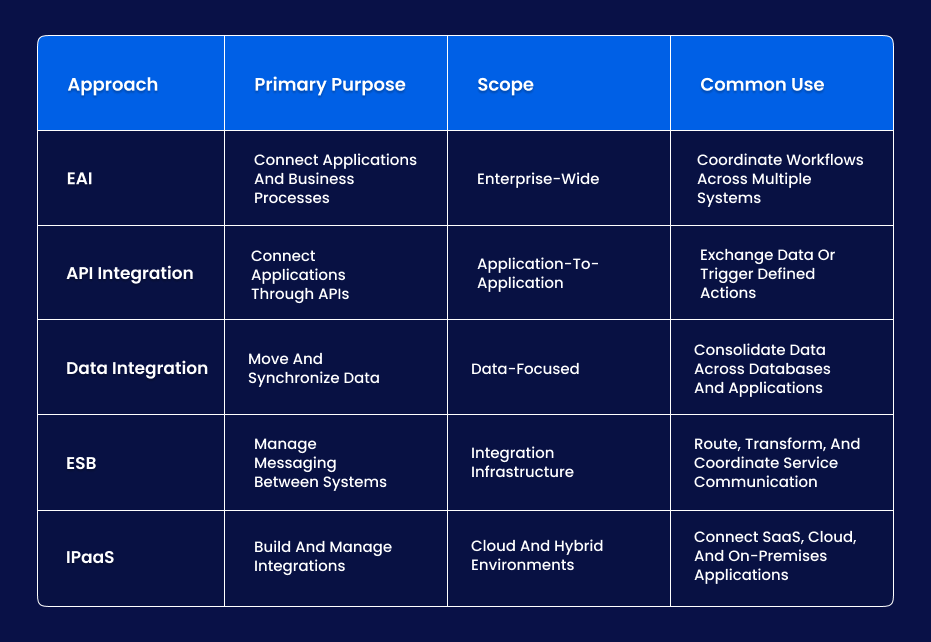
EAI Compared with Data Integration, APIs, ESB and iPaaS
These technologies support enterprise integration, but each serves a different purpose.
EAI is the broader approach for connecting business applications, sharing data, and coordinating processes across multiple systems.
API integration connects applications through defined interfaces, while data integration focuses on transferring and synchronizing data.
ESB provides centralized routing and messaging between systems, and iPaaS offers a cloud-based platform for building and managing integrations across SaaS, cloud, and on-premises applications.
Enterprise Application Integration Examples
EAI connects business applications so data, transactions, and process updates can move between systems without repeated manual work.
CRM and ERP Integration
CRM and ERP integration allows customer, sales, order, invoice, and account data to move between both systems.
For example, a confirmed sales order in the CRM can be sent to the ERP for billing and processing, while invoice or payment status can return to the sales team.
Ecommerce Integration
Ecommerce integration connects the online store with inventory management, warehouse, ERP, and fulfillment systems.
When an order is placed, stock levels can update automatically, fulfillment can begin, and shipping or order status can return to the storefront.
HR and Payroll Integration
HR and payroll integration synchronizes employee records between HR management and payroll applications.
Changes to salary, employment status, benefits, or employee details can flow automatically to payroll without duplicate data entry.
Customer Support and Order Management Integration
Customer support software can connect with order management, ecommerce, subscription, and account systems.
Agents can view order history, delivery status, subscriptions, and account details from connected applications without switching between multiple tools.
Finance and Operational System Integration
Finance integration connects accounting applications with ERP, billing, procurement, order management, and other operational systems.
Approved transactions, invoices, expenses, and payment data can move into financial systems automatically, reducing manual reconciliation and reporting delays.
Legacy and Cloud Application Integration
Legacy application integration connects older business systems with modern cloud applications using middleware, APIs, adapters, or custom connectors.
This allows selected legacy data and business functions to work with newer platforms without requiring a complete system replacement.
Challenges of Enterprise Application Integration
Ineffective integrations can create system dependencies that are difficult to manage and maintain.
Legacy System Compatibility
Older applications may lack modern APIs or rely on proprietary interfaces. Custom adapters or middleware may be needed to bridge the gap.
Legacy constraints should be assessed before the architecture is selected.
Inconsistent Data Structures
Different applications may represent the same customer, product, order, or account differently.
Poor mapping can create incomplete records, duplicates, or synchronization errors.
Data ownership, validation rules, and transformation logic should be defined before data starts moving between platforms.
API and Vendor Limitations
Third-party platforms may restrict endpoints, request volumes, supported actions, or authentication methods.
Required processes should be checked against vendor capabilities before implementation begins.
Security and Access Control
Integrations create additional access paths into business applications.
Credentials, service accounts, permissions, and exchanged information require appropriate protection.
Authentication, authorization, encryption, and access scopes should match the sensitivity of the systems involved.
Integration Dependencies
One process may depend on several services remaining available.
A failure in one platform can interrupt downstream actions.
Retries, queues, timeout handling, fallback behavior, and dependency monitoring should be built into the design.
Monitoring and Failure Recovery
Integration failures may not be visible to business users.
Centralized logs, alerts, transaction tracking, retries, and recovery procedures help teams identify issues before they create wider data inconsistencies.
Long-Term Maintenance
Enterprise applications change over time. APIs are updated, vendors modify interfaces, business processes evolve, transaction volumes increase, and new tools are introduced.
EAI should be treated as an ongoing operational capability rather than a one-time project.
Benefits of Enterprise Application Integration
The main value of EAI is connecting disconnected applications so data and business processes can flow smoothly across systems.
More Consistent Data
Connected platforms can exchange updates according to defined rules, reducing conflicting customer, order, account, inventory, or transaction records.
Less Manual Work
Employees spend less time copying information between applications or reconciling records maintained by different departments.
Better Process Automation
Processes such as order fulfillment, onboarding, account provisioning, payroll updates, and finance transactions can continue automatically after a triggering event.
Improved Interoperability
Applications from different vendors and technology environments can participate in the same business process through a shared integration layer.
Faster Access to Updates
Teams can receive updates as business events happen, reducing delays caused by manual imports or scheduled data transfers.
Better Use of Existing Technology
Organizations can connect valuable legacy and modern software without replacing every platform solely to improve interoperability.
Ineffective integrations can create system dependencies that are difficult to manage and maintain.
Legacy System Compatibility
Older applications may lack modern APIs or rely on proprietary interfaces. Custom adapters or middleware may be needed to bridge the gap.
Legacy constraints should be assessed before the architecture is selected.
Inconsistent Data Structures
Different applications may represent the same customer, product, order, or account differently.
Poor mapping can create incomplete records, duplicates, or synchronization errors.
Data ownership, validation rules, and transformation logic should be defined before data starts moving between platforms.
API and Vendor Limitations
Third-party platforms may restrict endpoints, request volumes, supported actions, or authentication methods.
Required processes should be checked against vendor capabilities before implementation begins.
Security and Access Control
Integrations create additional access paths into business applications.
Credentials, service accounts, permissions, and exchanged information require appropriate protection.
Authentication, authorization, encryption, and access scopes should match the sensitivity of the systems involved.
Integration Dependencies
One process may depend on several services remaining available.
A failure in one platform can interrupt downstream actions.
Retries, queues, timeout handling, fallback behavior, and dependency monitoring should be built into the design.
Monitoring and Failure Recovery
Integration failures may not be visible to business users.
Centralized logs, alerts, transaction tracking, retries, and recovery procedures help teams identify issues before they create wider data inconsistencies.
Long-Term Maintenance
Enterprise applications change over time. APIs are updated, vendors modify interfaces, business processes evolve, transaction volumes increase, and new tools are introduced.
EAI should be treated as an ongoing operational capability rather than a one-time project.
How to Implement Enterprise Application Integration
A successful EAI project starts with business requirements and system dependencies rather than a technology choice.
1. Map Existing Applications and Dependencies
List each application, its owner, available APIs, data sources, current integrations, and downstream dependencies to see where data starts, where it moves, and which business processes rely on it.
2. Define Integration Requirements
Specify which applications must connect, what data they need to exchange, how often updates should happen, and which business events should trigger data transfer or system actions.
3. Map Data and Process Flows
Document the source system, target system, required fields, data mappings, transformation rules, validation checks, and process order for each integration flow.
4. Select the Integration Architecture
Choose an enterprise application integration architecture based on the number of systems, legacy dependencies, transaction volume, API support, real-time requirements, security needs, and expected growth.
5. Select the Integration Technology
Select APIs, middleware, ESB, iPaaS, connectors, or event-driven messaging based on how systems need to communicate, process data, and coordinate workflows.
6. Build and Configure the Integrations
Configure connectors, authentication, data mappings, routing rules, and business logic. For custom integrations, a structured enterprise software development process helps align development, testing, and deployment with the integration architecture.
7. Validate Integration Performance and Failures
Test data validation, authentication, service outages, duplicate events, synchronization conflicts, timeouts, and recovery processes to confirm the integration works reliably under both normal and failure conditions.
This testing aligns with broader software development lifecycle practices while focusing on EAI data flow, system dependencies, error handling, and recovery.
8. Deploy and Monitor
Deploy integrations with logs, alerts, transaction tracking, and performance monitoring so teams can identify which integration failed, which data or process was affected, and whether retry or manual recovery is needed.
9. Maintain and Improve
Review integrations when APIs change, systems are upgraded, business rules change, new applications are added, or transaction volumes grow, and keep dependency maps, architecture diagrams, and data contracts current.
Enterprise Application Integration Best Practices
Each integration should have a clear business purpose, technical owner, and defined data ownership across connected systems.
Use reusable APIs, shared services, or middleware instead of unnecessary point-to-point connections to simplify maintenance and scalability.
Plan security, monitoring, and failure handling early. Authentication, retries, timeouts, duplicate events, and system dependencies should be documented and reviewed
Modern Enterprise Application Integration in 2026
Modern EAI combines APIs, SaaS connectors, cloud integration platforms, middleware, event-driven systems, and near-real-time data synchronization.
Enterprises often connect cloud applications and microservices with ERP platforms, legacy systems, SOA, and existing ESB infrastructure.
AI-enabled applications also require secure system access, reliable data flows, clear permissions, traceable actions, and visibility into integration failures.
How to Choose the Right EAI Approach?
The right EAI approach depends on your business processes, existing technology environment, integration complexity, and long-term operational needs.
Consider how many applications must connect, where they run, how data moves between them, and whether updates need to happen in real time.
Direct API integration may work for a few systems, while middleware, ESB, iPaaS, SOA, or event-driven integration may be better for larger environments with multiple workflows and dependencies.
The selected approach should support reliable data exchange, secure communication, future system changes, and manageable maintenance costs.
EAI Use Cases Across Different Industries
EAI requirements vary by industry, but the goal remains consistent to allow separate applications to support the same operational process.
Ecommerce and Retail
Ecommerce businesses may need to connect storefronts, ERP, CRM, inventory, warehouse, fulfillment, payment, support, and analytics platforms.
Integration helps order, customer, inventory, payment, and fulfillment data stay aligned across these tools.
Healthcare
Healthcare organizations may need interoperability between scheduling, administrative, billing, clinical, and operational applications.
EAI can support controlled data exchange while maintaining defined access and workflow rules.
Financial Services
Financial organizations often rely on customer platforms, transaction systems, reporting tools, and internal applications.
Integration can coordinate customer and transaction processes while maintaining appropriate access controls and auditability.
Manufacturing
Manufacturers may connect ERP, manufacturing, procurement, inventory, warehouse, and supply chain applications.
Production activity can update inventory, purchasing, and planning processes so teams work from more consistent data.
Logistics and Supply Chain
Order management, warehouse, carrier, inventory, tracking, and customer applications frequently exchange events throughout the fulfillment process.
Integration helps shipment, stock, delivery, and exception updates reach the systems used by operations teams and customers.
SaaS and Technology Companies
SaaS companies may connect product platforms, CRM, billing, support, analytics, and internal business applications.
Account, subscription, billing, usage, and support data can flow between these tools, giving customer-facing teams a more complete view.
When Should a Business Consider an EAI Partner?
An EAI partner can help when integrations are difficult to maintain, legacy systems limit connectivity, failures disrupt operations, or multiple platforms require coordinated data flows and workflows.
SolCoders supports integration planning, architecture, APIs, custom connectors, middleware, legacy system integration, testing, monitoring, and ongoing improvements.
Final Thoughts
Enterprise application integration works best when architecture decisions begin with the process the business needs to run across multiple systems.
Poorly planned connections can create new dependencies, failure points, and maintenance problems.
Modern enterprises often use a mix of APIs, middleware, event-driven integration, iPaaS, legacy connectivity, and established enterprise infrastructure.
SolCoders can help plan and implement these connections around how applications, data, and teams actually need to work together.
SolCoders combines innovation and technology to deliver scalable, high-performance software solutions that streamline operations and accelerate digital transformation
In This Article
Frequently Asked Questions:
What is enterprise application integration (EAI)?
EAI connects separate business applications so they can share data, trigger actions, and coordinate workflows without relying on repeated manual data entry.
How does enterprise application integration work?
EAI enables connected applications to exchange data and trigger processes using APIs, connectors, middleware, or messaging.
It can transform information and apply business rules before delivering it to the appropriate system.
What is the difference between EAI and API integration?
The main difference is scope, EAI connects multiple business systems and coordinates data and workflows across them, while API integration connects specific applications through APIs to exchange data and functionality.
How does SolCoders approach enterprise application integration?
SolCoders reviews applications, APIs, data flows, dependencies, and business processes before defining the integration architecture, connectors, middleware, testing, and monitoring required for the project.
Related Blogs
Latest Blogs
Shopify B2B Wholesale: Complete Setup Guide, Features & How It Works
Blogs Software Development Shopify B2B Wholesale: Complete Setup Guide, Features & How It Works Shopify…

Shopify Functions Guide: Custom Discounts, Delivery and Payment Rules
Blogs E-commerce Development Shopify Functions Guide: Custom Discounts, Delivery and Payment Rules Shopify Functions Guide:…
Enterprise Software Development: Complete Guide for 2026
Blogs Software Development Enterprise Software Development: Complete Guide for 2026 Enterprise Software Development: Complete Guide…