

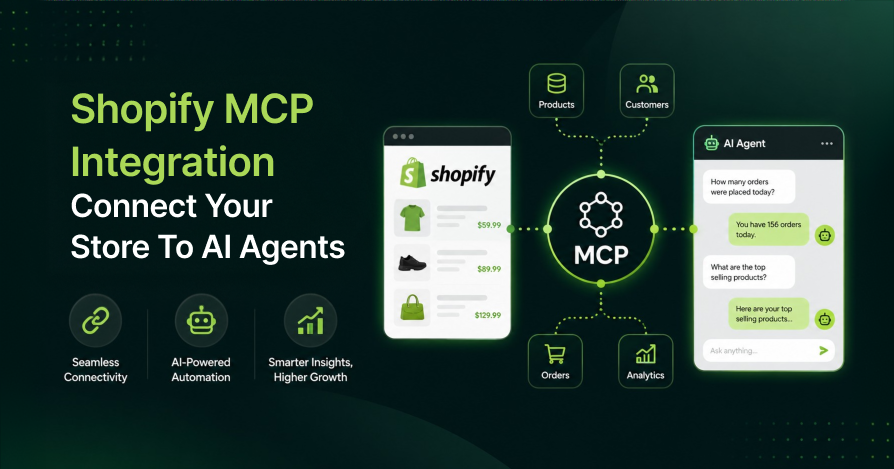
Shopify MCP Integration is becoming essential for online stores as AI agents increasingly influence how customers discover and buy products.
With AI-powered shopping journeys delivering higher conversion rates and AI-driven orders growing rapidly, merchants need a reliable way to connect Shopify to AI platforms like ChatGPT, Claude, Copilot, and Gemini.
In this guide, you’ll know exactly how Shopify MCP works, which server fits your use case, and how to set it up for your store.
What Is Shopify MCP Integration?
Shopify MCP Integration connects your store to AI agents using the Model Context Protocol (MCP). An open standard that lets AI systems securely access store data, products, orders, inventory, and customer information through a single, standardized interface.
Think of MCP as a universal adapter between AI systems and commerce platforms. Instead of creating separate integrations for every AI tool, you connect your store once through an MCP server and any compatible AI agent can plug into it and access your store seamlessly.
Anthropic introduced MCP in late 2024. Shopify, Google, Microsoft, and OpenAI all adopted it. By 2026, it became the standard for AI-to-commerce connections.
Why Shopify MCP Matters?
To enable these capabilities, AI systems need a secure and standardized way to interact with Shopify stores.
Without MCP: AI Agent → Custom API → Middleware → Shopify
With MCP: AI Agent → Shopify MCP Server → Shopify Store
By providing a standardized communication layer between Shopify and AI systems, MCP reduces integration complexity, eliminates the need for custom connections for every AI platform, and creates a more scalable architecture for AI-powered ecommerce operations.

The Complete Shopify MCP Ecosystem
Most guides cover one or two Shopify MCP servers. Four distinct ones exist, each serving a completely different purpose. Confusing them leads to misconfigured setups and wasted developer time.
1. Storefront MCP Server: Built-In, No Setup Required
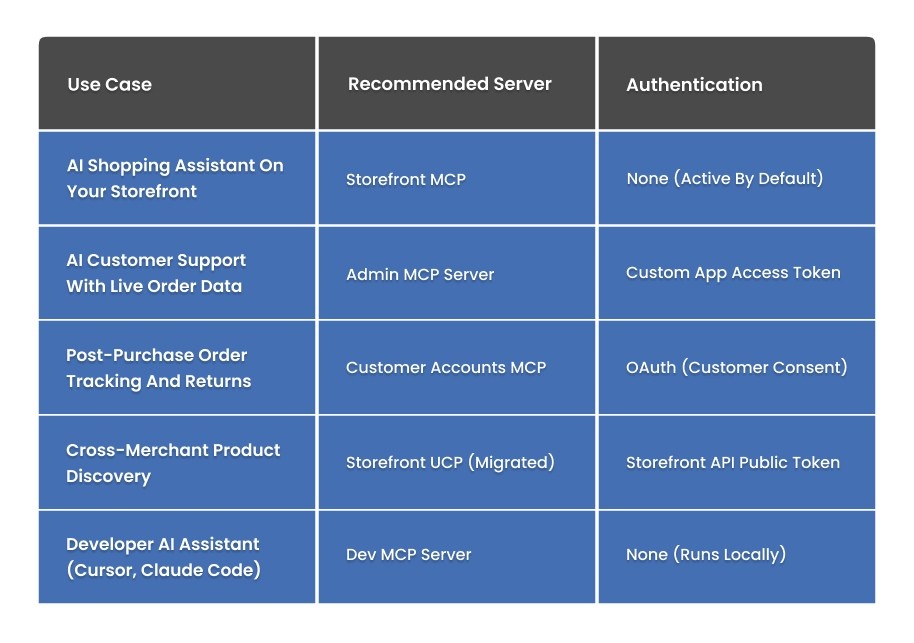
Every Shopify store automatically exposes a Storefront MCP endpoint. No API keys, no custom app, no authentication needed.
Endpoint: https://{your-store}.myshopify.com/api/mcp
This server runs consumer-facing. It lets AI shopping agents search your product catalog, answer policy questions, manage carts, and check order status, all through natural language.
Any UCP compliant agent, such as ChatGPT Shopping Mode, Perplexity, or Claude can automatically connect and interact with your store through this endpoint.
Verify your store is agent-addressable right now by running:
curl -X POST https://YOUR-STORE.myshopify.com/api/mcp -H “Content-Type: application/json” -d ‘{“jsonrpc”:”2.0″,”method”:”tools/list”,”id”:1}’
A tool list in the response confirms your store is live for AI agents. No further action needed.
2. Admin MCP Server: Full Back-Office Access
The Admin MCP Server is the most powerful option and requires deliberate setup. It connects AI agents to your full back-office, like orders, customers, inventory, fulfillment, discounts, and metafields.
Authentication runs via a custom app access token with specific Admin API scopes.
Use this server when you want AI agents to actually operate your store. Answering support queries with live order data, adjusting inventory, generating merchandising reports, and running bulk product updates all run through here.
3. Catalog MCP Server: Now Migrated to UCP
The Catalog MCP Server handled cross-merchant product discovery, allowing AI agents to search across all eligible Shopify stores simultaneously. On April 22, 2026, Shopify migrated this server to the Universal Commerce Protocol (UCP).
The endpoint changed, tool names changed, and the old /api/mcp path is deprecated as of May 30, 2026. The new path is /api/ucp/mcp.
4. Customer Accounts MCP Server
The Customer Accounts server gives authenticated agents access to a customer’s order history, address data, and account state.
Agents can answer post-purchase questions, handle order tracking, initiate returns, and process account changes without the customer logging into a web portal.
This server requires OAuth consent from the customer before any access. It powers branded shopping assistants that actually serve customers post-purchase.
5. Dev MCP Server: For Developers Only
The Dev MCP Server never touches live store data. It connects AI coding tools (Claude Code, Cursor, Gemini CLI) to Shopify’s documentation, GraphQL API schemas, and code validators. It runs locally on a developer’s machine.
npx -y @shopify/dev-mcp@latest
Use this to search Shopify docs, validate GraphQL queries against live schemas, and build Shopify apps faster. Not relevant for merchants who do not write code.
Which Shopify MCP Server Do You Need?
How to Set Up the Shopify Admin MCP Server?
Full setup takes under 30 minutes.
Step 1: Create a Custom App in Shopify Admin
Go to Settings, then Apps and sales channels, then Develop apps, then Create an app. Name it clearly, something like AI Agent MCP Access, so you can identify it later.
Under API credentials, configure only the scopes your agent actually needs. Start with read-only:
⦁ read_products (add write_products only when needed)
⦁ read_orders
⦁ read_customers
⦁ read_inventory (add write_inventory only when needed)
⦁ read_locations
Over-permissioned tokens are the most common security mistake in Shopify MCP setups. Grant only what the agent requires.
Step 2: Install the Correct npm Package
The package you need is shopify-mcp, not shopify-mcp-server. These are two different packages with different requirements.
The error “SHOPIFY_ACCESS_TOKEN environment variable is required” usually means the environment variable is not set correctly or the wrong package has been installed.
npm install -g shopify-mcp
Or run without installing:
npx shopify-mcp
Install directly from: Shopify MCP on npm.
Step 3: Set Environment Variables
SHOPIFY_STORE_DOMAIN=yourstore.myshopify.com
SHOPIFY_ACCESS_TOKEN=shpat_xxxxxxxxxxxxxxxxxxxx
Step 4: Configure Your AI Client
For Claude Desktop, add this block to your claude_desktop_config.json file:
{
“mcpServers”: {
“shopify”: {
“command”: “npx”,
“args”: [“shopify-mcp”],
“env”: {
“SHOPIFY_STORE_DOMAIN”: “yourstore.myshopify.com”,
“SHOPIFY_ACCESS_TOKEN”: “shpat_xxxxxxxxxxxxxxxxxxxx”
}
}
}
}
Restart Claude Desktop after saving. You can now ask natural-language questions about your store data directly in the chat window.
Step 5: Test with Read-Only Queries First
Start with: List my 10 most recent orders. A clean response confirms your Shopify MCP API connection is live. Test write operations only after the governance controls below are in place.
Shopify UCP Migration 2026: What Changes and What to Do?
Deadline is June 15, 2026. After that date, the old /api/mcp endpoint stops working entirely. Shopify classified this as a Breaking API Change.
What Changed?
Shopify has migrated the Storefront MCP endpoint from /api/mcp to /api/ucp/mcp, with updated tool names, request/response formats, and a required Storefront API proxy for Hydrogen storefronts.
Meanwhile, if you’re using custom Hydrogen apps, AI shopping agents, or integrations built on the old endpoint, update them to remain compatible with the new UCP architecture effective May 30, 2026.
Who Needs to Act?
The migration primarily impacts custom Hydrogen storefronts, AI-powered shopping assistants, and any third-party tools connected through the legacy /api/mcp endpoint.
While managed solutions like Weaverse Pilot may already include the necessary updates, custom implementations should be reviewed and updated to avoid compatibility issues.
UCP Migration Checklist
- Search your codebase for every /api/mcp reference.
- Replace with /api/ucp/mcp.
- Update tool names according to Shopify’s UCP migration guide.
- Add the Storefront API proxy if you are on Hydrogen 2026.4 or later.
- Test everything on a staging store before pushing to production.
Governance Framework: Keeping AI Agents from Causing Damage
AI agents with write access to your Shopify store are powerful, and they can cause real damage when misconfigured. Bulk product deletions, incorrect discount applications, and customer data exposure are all possible without controls.
Start Read-Only Mode
Begin with read-only API scopes for at least two to four weeks. Your agent can answer inventory and order questions, surface reports, and flag issues without write access. Expand permissions only after you validate their outputs against real queries.
Add Approval Steps for Write Operations
Before any AI agent executes a mutation such as a price update, inventory adjustment, or order cancellation, it should first pass through a human approval layer.
However, this can be implemented using a Slack workflow with approve/deny buttons, or through a Shopify Flow automation that holds the action until manual confirmation is received.
For stores processing thousands of orders per month, allowing automated write operations without approval checkpoints increases operational risk rather than improving efficiency.
Give Each Agent Its Own Token
Avoid using the same access token for every AI agent. Instead, create separate custom apps based on each agent’s responsibilities.
For example, a customer support agent with access to orders and customers, an inventory agent with inventory permissions, and a merchandising agent with product management access.
This approach improves security and makes it easier to revoke or update one agent’s access without disrupting the others.
Keep Audit Logs
The Admin MCP Server logs every API call made by your AI agents. Store these logs in a database or data warehouse so you have a clear record of who did what and when. If an issue comes up, you can quickly trace the actions taken and identify the cause.
Where Shopify MCP Integration Delivers Real ROI?
Before investing setup time, you want a clear business case. Based on real implementations, ROI consistently appears in three areas:
Customer Support Response Time
Tier-1 support queries, such as Where is my order, Is this in stock, and Can I update my address make up roughly 60 to 70 percent of total ecommerce support volume.
With an AI agent connected to the Admin MCP Server, these queries resolve in seconds using live order data rather than cached or manual lookups.
Stores using agent-assisted support commonly cut first-response times from several hours to under two minutes for covered query types.
Inventory Monitoring
Rather than only responding to stock questions, MCP-connected agents continuously monitor low-stock thresholds and alert buying teams before products run out.
For high-SKU stores, this removes the manual tracking burden across hundreds of variants and locations.
Merchandising Productivity
Bulk updates to product titles, tags, and metafields are essential for catalog consistency but highly repetitive.
MCP-enabled agents draft these updates automatically, standardize them, and stage them for human approval before publishing. This proves especially useful during seasonal campaigns.
Four-Phase MCP Adoption Roadmap
Stores that get sustained value from Shopify MCP do not try to automate everything at once. They move through phases:
Phase 1: Reporting.
Connect in read-only mode. Train your team to use it for daily reports, revenue by product, inventory status, and order volume. This phase builds trust in the AI outputs before you grant any ability to act.
Phase 2: Recommendations
Expand to additional data sources. Have the agent surface recommendations like Reorder SKU-1042, you will stock out in 6 days at current velocity. The agent still advises only, no write access yet.
Phase 3: Assisted Actions
Enable write access behind approval workflows. The agent drafts a bulk price update for your flash sale. A human approves with one click. The agent executes. AI does the work; a human makes the final call.
Phase 4: Autonomous Workflows
For high-confidence, low-risk operations such as reorder triggers, tagging fulfilled orders, and sending post-purchase review requests, remove the approval step. The agent runs autonomously within defined boundaries.
Why Clean Product Data Can Make or Break Your Store’s AI Visibility?
Connecting your store through Shopify MCP is only the first step. The real impact comes from accurate, complete, and AI-friendly product data.
Even the most advanced MCP setup can’t fix unclear titles, missing attributes, or poorly structured catalogs. AI systems rely heavily on structured data to understand, rank, and recommend your products across AI platforms.
If your product data is incomplete or inconsistent, your store becomes harder to surface in AI-driven search results, no matter how well your MCP integration is configured. Clean, detailed and well-structured product information is what ensures your products are accurately interpreted and confidently recommended by AI agents.
Final Thoughts
Shopify MCP Integration provides merchants with a practical way to connect AI agents to store operations. Instead of building separate integrations for every AI platform, businesses can use a standardized framework that supports automation, scalability, and long-term growth.
As AI adoption accelerates across ecommerce, Shopify MCP is set to play a central role in inventory management, customer support, merchandising, and analytics. Businesses that invest early can build a stronger foundation for the next generation of agentic commerce.
If you’re ready to implement MCP Integration for your store, connect with SolCoders, which provides support for Shopify integration workflows that help structure stores for scalability, performance, and modern commerce systems.
SolCoders combines innovation and technology to deliver scalable, high-performance software solutions that streamline operations and accelerate digital transformation
In This Article
Frequently Asked Questions:
What is Shopify MCP?
Shopify MCP is a standardized protocol that allows AI agents to securely connect to your store and access products, orders, inventory, and customer data through a unified interface, without requiring custom integrations for Claude, ChatGPT, or Copilot.
Does Shopify MCP require authentication?
Yes. The Admin MCP Server needs a custom app access token with specific API scopes. The Storefront UCP server uses a public Storefront API token. The Dev MCP Server runs locally and needs no token since it only reads documentation.
How do I enable Shopify MCP on my store?
Create a custom app under Settings, then Apps, then Develop apps in your Shopify Admin. Set the API scopes, copy the access token, install shopify-mcp via npm, and configure your AI client with your store domain and token. The full setup takes under 30 minutes.
Is Shopify MCP free or paid?
MCP is free to use. Costs only come from your Shopify plan and any AI tools or models you connect.
Do I need Shopify Plus for MCP integration?
No. MCP works on all Shopify plans. Shopify Plus only helps with higher API limits at scale.
What is the difference between Shopify MCP and Shopify Flow?
Shopify Flow is rule-based automation inside Shopify, while MCP enables AI agents to analyze data and perform cross-system actions.
Which npm package should I use for Shopify MCP?
Use shopify-mcp for Admin integration, @shopify/dev-mcp for development tools, and @shopify/ucp-cli for UCP migration.
Related Blogs
Latest Blogs
Shopify B2B Wholesale: Complete Setup Guide, Features & How It Works
Blogs Software Development Shopify B2B Wholesale: Complete Setup Guide, Features & How It Works Shopify…
Shopify Functions Guide: Custom Discounts, Delivery and Payment Rules
Blogs E-commerce Development Shopify Functions Guide: Custom Discounts, Delivery and Payment Rules Shopify Functions Guide:…

Enterprise Application Integration: How it Transform Businesses
Blogs Software Development Enterprise Application Integration: How It Transforms Businesses Enterprise Application Integration: How It…