
- Blogs
- Software Development
- Build vs Buy Software: A Strategic Decision Framework for Growing Businesses
- Blogs
- Software Development
- Build vs Buy Software: A Strategic Decision Framework for Growing Businesses
Build vs Buy Software: A Strategic Decision Framework for Growing Businesses
- Published: June 19, 2026

Written By : Sualeha
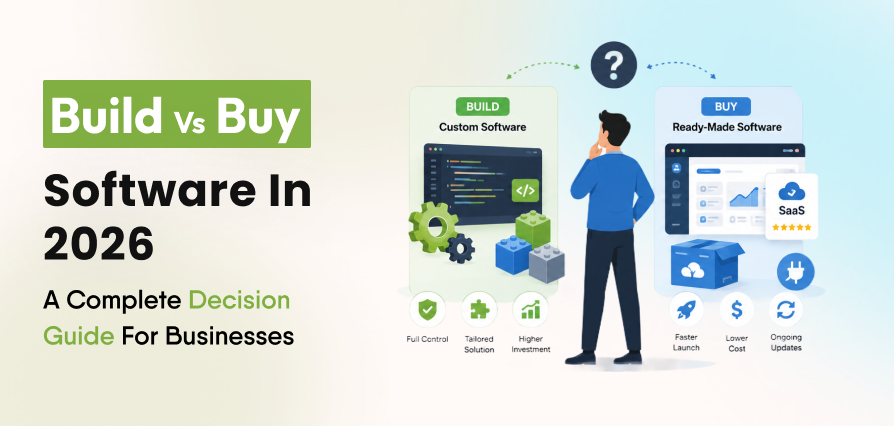
Build vs buy software is one of the key technology decisions a growing business makes in 2026. It impacts cost, scalability, efficiency, competitive advantage, and long-term ROI. Choosing the wrong approach can lead to extra expenses, integration issues, and limits that slow business growth.
As software becomes central to operations, leaders must decide between custom software development and purchasing ready-made solutions.
Off-the-shelf tools offer speed and lower upfront cost, while custom software provides more control, flexibility, and better alignment with business goals.
This guide presents a complete build vs buy analysis using a proven framework, covering cost, risks, scalability, integration needs, vendor lock-in, and long-term ROI to support better software investment decisions.
What Is Build vs Buy Software?
Build vs buy software refers to the process of deciding whether a business should develop a custom software solution internally or purchase an existing software product from a vendor.
Build Approach
The build approach involves creating software specifically for your business requirements. An internal development team or an external technology partner may do this.
Buy Approach
A buy approach involves purchasing or subscribing to an existing software product, such as CRM systems, ERP platforms, accounting software, project management tools, or SaaS platforms.
The right choice depends on factors such as business requirements, budget, timeline, software scalability goals, software integration needs, competitive differentiation, and long-term software ROI.
Why This Decision Matters?
Software is now more critical than ever for driving business growth. Organizations now depend on digital tools for customer engagement, operations, analytics, automation, and compliance.
Rising Business Pressure
Businesses face increasing pressure to launch products faster, improve customer experiences, reduce operational costs, maintain security standards, and adapt to changing market conditions.
The Cost of Getting It Wrong
A poor software procurement strategy can lead to wasted investments, operational bottlenecks, and technology limitations that become expensive to fix later.
A poor build vs buy software decision early on often resurfaces as a bigger, costlier problem within two to three years.
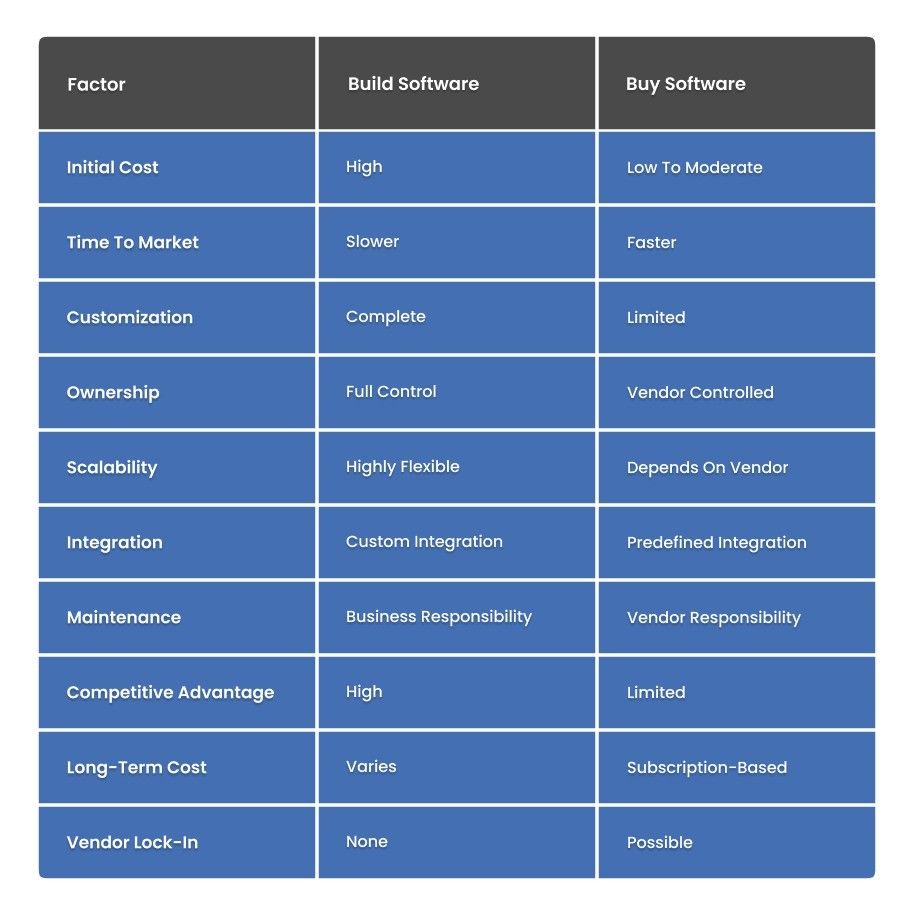
Build vs Buy Software: Key Differences Comparison
Understanding the True Cost of Software Ownership
Many businesses focus only on upfront costs when comparing build and buy options. This often leads to inaccurate decision-making.
The Real Question
The real question is not what software costs today. The real question is what software will cost over its entire lifecycle.
What Ownership Actually Includes?
Software ownership includes implementation, maintenance, support, upgrades, integrations, security updates, employee training, and future expansion. Failing to account for these costs can significantly impact long-term ROI.
What Does Total Cost of Ownership (TCO)?
Total cost of ownership (TCO) includes all costs of a software solution over its full lifecycle, not just the initial price.
A custom-built solution may seem expensive upfront but can become more cost-effective over time by removing recurring license fees. SaaS tools often look cheaper monthly, but costs grow with per-user pricing, add-ons, and scaling.
For a fair build vs buy comparison, businesses should evaluate development or licensing costs, implementation time, ongoing maintenance, security and compliance needs, and integration with existing systems. These factors define both short- and long-term financial impact.
Other key factors include staff training, scaling costs as the business grows, and the opportunity cost of a delayed launch. Together, these elements give a complete view of the real cost behind any software decision.
Benefits of Building Custom Software
Building software gives businesses complete control over functionality, architecture, and future development.
Full Customization
Custom software aligns directly with business workflows. Teams do not need to adjust their processes to fit software limitations. Businesses seeking specialized workflows often invest in tailored software solutions to support long-term growth.
Competitive Advantage
Custom applications can provide unique capabilities that competitors cannot easily replicate.
Greater Software Scalability
Businesses can design software architecture around future growth plans rather than relying on vendor limitations.
Full Ownership
The organization owns the intellectual property, source code, and product roadmap.
Better Software Integration
Custom software can integrate seamlessly with existing systems and databases without the workarounds that off-the-shelf tools often require.
Limitations of In-House Software Development
Despite its advantages, building software involves significant responsibilities.
Higher Initial Investment
Development costs can be substantial, especially for complex enterprise applications.
Longer Development Timelines
Building software takes time. Requirements gathering, development, testing, deployment, and training can take months.
Ongoing Maintenance
Software requires continuous updates, security patches, performance improvements, and technical support.
Talent Requirements
Organizations need skilled developers, architects, testers, and project managers to support the build long-term.
Benefits of Buying Existing Software
Buying software remains the preferred option for many organizations because it provides immediate access to proven functionality.
Faster Deployment
Businesses can roll out software in a shorter timeframe, helping teams adopt new tools quickly and accelerate operational improvements.
Lower Upfront Costs
Subscription-based models reduce the need for large initial investment in infrastructure or software licenses. This makes advanced tools more accessible for startups and growing businesses.
Vendor Support
Most software providers offer continuous updates, maintenance, security improvements, and technical support as part of their service. This reduces the need for a large in-house IT team and ensures smooth system performance.
Proven Reliability
Established platforms are already tested by a large number of users in real-world conditions, which improves stability and reduces the risk of major system failures.
Predictable Costs
Monthly or yearly subscription pricing makes it easier for businesses to plan and manage their budgets without unexpected expenses.
Limitations of Off-the-Shelf Software
Buying software also comes with limitations.
Limited Customization
Organizations often have to adjust their workflows to fit the software’s fixed features instead of getting fully customized solutions. This can reduce flexibility for businesses with unique needs.
Vendor Lock-In
Once a business adopts a platform, it can become dependent on the vendor’s pricing, updates, and policies. Switching later may be difficult due to migration challenges and added costs.
Integration Challenges
Ready-made software may not always integrate smoothly with existing systems, leading to compatibility issues or requiring extra tools and configuration.
Recurring Costs
Subscription fees continue indefinitely and may increase over time.
Organizations evaluating these trade-offs should understand the challenges involved in choosing between custom and ready-made software before making a final decision.
When Should a Business Build Software?
Building makes sense when your business has a unique process that existing software cannot replicate, when data ownership is critical for compliance or security reasons, or when the software itself will become a core part of your competitive advantage.
It also fits businesses with the internal technical resources or budget to support long-term development and maintenance.
When Should a Business Buy Software?
Buying makes sense when speed matters more than full customization, when the required functionality is standard across most businesses, or when the cost of building outweighs the benefit of owning the software outright.
It also fits businesses without an internal engineering team capable of supporting custom development.
How Vendor Lock-In Affects Long-Term Business Flexibility?
Vendor lock-in occurs when switching software providers becomes difficult, expensive, or disruptive.
Common Causes
Vendor lock-in usually comes from proprietary data formats, custom vendor integrations, long-term contracts, limited export capabilities, and dependence on vendor-specific features.
The Real Risk
Vendor lock-in can reduce flexibility and increase future software costs. Businesses should evaluate exit strategies before purchasing software.
Questions To Ask Before Signing
Before committing to a software vendor, evaluate data portability, integration flexibility, pricing policies, and the complexity of migrating to another solution in the future.
Is a Hybrid Build-and-Buy Approach the Best Option?
For many businesses, the best solution is a combination of building and buying software.
What a Hybrid Approach Looks Like?
A hybrid strategy combines off-the-shelf software with custom-built components. For example, a company may use a CRM platform for sales management while developing custom integrations or internal tools to support unique workflows.
Why It Works?
A hybrid approach balances speed, cost efficiency, and flexibility. It allows businesses to use proven software for standard operations while building custom functionality where it creates the most value.
This model works particularly well when core processes can run on existing software, but certain business requirements need a tailored solution.
Build vs Buy Software Decision Framework
The following six-step framework simplifies the build vs buy software decision process.
Step 1: Business Requirements
Clearly define what the software must accomplish. Identify core features, compliance needs, user requirements, and process dependencies.
Step 2: Budget Evaluation
Calculate both short-term and long-term costs, including development costs, licensing costs, support expenses, and infrastructure requirements.
Businesses comparing the cost of building custom software should include maintenance and enhancement expenses rather than focusing only on initial development.
Step 3: Timeline Assessment
Determine how quickly the solution must be deployed. Urgent projects often favor buying software. Long-term strategic projects may justify building software.
Step 4: Scalability Planning
Assess future growth requirements. Will user volume increase? Will new markets be added? Will workflows become more complex?
Step 5: Integration Requirements
Evaluate software integration needs across existing systems, APIs, data synchronization, and automation workflows.
Step 6: Long-Term ROI Analysis
Compare expected value against total investment by reviewing revenue growth, cost savings, productivity improvements, and competitive advantage. This step gives you the clearest read on long-term software ROI.
Common Mistakes Businesses Make
Many organizations make costly mistakes during the software selection process.
Focusing Only on Upfront Cost
Low purchase prices can be misleading, as they often do not reflect the total cost of ownership. Long-term expenses such as upgrades, support, and scaling can make a cheaper solution more expensive over time.
Ignoring Software Scalability
Software that meets today’s requirements may not be able to support future business growth. Lack of scalability can lead to performance issues and costly system replacements later.
Underestimating Maintenance Requirements
Custom or complex software requires continuous updates, monitoring, and improvements. Ongoing maintenance costs should always be planned beyond the initial launch phase.
Overlooking Integration Complexity
Disconnected systems can create operational inefficiencies and data silos. Proper integration planning is essential to ensure smooth workflows and consistent data flow across platforms.
Failing to Evaluate Vendor Lock-In
Relying heavily on a single vendor can limit flexibility and create long-term risks. Switching providers later can be expensive, complex, and disruptive to business operations.
Real-World Business Scenarios
Scenario 1: Growing Ecommerce Brand
An eCommerce company needs advanced inventory automation. With off-the-shelf solutions covering 80% of requirements, a hybrid build vs buy approach works best by combining a commercial platform with custom automation modules.
Scenario 2: Healthcare Organization
A healthcare provider requires strict compliance and specialized workflows. Custom software provides greater control over security, compliance, and patient management processes.
Scenario 3: Fast-Growing Startups
From a build vs buy perspective, startups needing immediate CRM, billing, and customer support capabilities often choose SaaS platforms to ensure rapid market entry without the delays of custom development.
How SolCoders Helps Businesses Make Build vs Buy Decisions?
Choosing between building and buying software requires evaluating business needs, costs, scalability, and long-term goals.
SolCoders helps businesses make informed decisions by analyzing requirements, estimating the total cost of ownership, and evaluating vendors and SaaS platforms to recommend the best approach.
When custom development is required, we deliver tailored solutions aligned with business goals.
Final Thoughts
There is no universal answer to the build vs buy software decision. The right choice depends on a business’s goals, requirements, budget, and long-term strategy.
Organizations should build software when they need unique functionality, extensive customization, and full control. Buying software is often the better option when speed, predictable costs, proven reliability, and vendor support are the main priorities.
Many businesses adopt a hybrid approach, combining SaaS or off-the-shelf solutions with custom development to balance flexibility, scalability, and efficiency.
Before deciding, organizations should evaluate requirements, total cost of ownership (TCO), integration needs, scalability, and long-term ROI. A structured framework helps reduce risk and support smarter technology decisions.
SolCoders combines innovation and technology to deliver scalable, high-performance software solutions that streamline operations and accelerate digital transformation
In This Article
Frequently Asked Questions:
What is build vs buy software?
Build vs buy software is the decision between creating custom software or purchasing an existing solution, based on business needs, cost, and flexibility.
What factors should businesses evaluate before choosing to build or buy software?
Businesses should assess requirements, cost, timelines, integrations, scalability, security, compliance, vendor lock-in, and overall business value.
Is it cheaper to build or buy software?
Buying is usually cheaper initially, while building can be more cost-effective long term if it reduces ongoing licensing costs and fits unique needs.
What is the total cost of ownership (TCO) in a build vs buy decision?
TCO is the total cost of a software solution over its lifecycle, including development or licensing, implementation, maintenance, support, infrastructure, upgrades, and training.
How does vendor lock-in affect software ownership and flexibility?
Vendor lock-in can limit flexibility, increase switching costs, and reduce control over customization and data portability.
Is a hybrid build-and-buy approach suitable for growing businesses?
Yes. A hybrid approach combines ready-made tools with custom solutions to balance speed, cost, and flexibility.
Related Blogs
Latest Blogs
Shopify B2B Wholesale: Complete Setup Guide, Features & How It Works
Blogs Software Development Shopify B2B Wholesale: Complete Setup Guide, Features & How It Works Shopify…
Shopify Functions Guide: Custom Discounts, Delivery and Payment Rules
Blogs E-commerce Development Shopify Functions Guide: Custom Discounts, Delivery and Payment Rules Shopify Functions Guide:…
Enterprise Application Integration: How it Transform Businesses
Blogs Software Development Enterprise Application Integration: How It Transforms Businesses Enterprise Application Integration: How It…