
- Blogs
- E-commerce Development
- Shopify API Integrations: Complete Guide for Modern Ecommerce Stores
- Blogs
- E-commerce Development
- Shopify API Integrations: Complete Guide for Modern Ecommerce Stores
Shopify API Integrations: Complete Guide for Modern Ecommerce Stores
- Published: May 18, 2026

Written By : Sualeha
Shopify API integrations act as the backbone that transforms a basic online store into a fully automated and scalable ecommerce system.
From syncing inventory across multiple warehouses to connecting CRM platforms with customer data or powering custom mobile apps, Shopify’s API ecosystem is essential for modern commerce in 2026.
This guide explains how Shopify APIs work, the differences between Shopify REST and GraphQL APIs, integration architecture, security best practices, pricing considerations, and how businesses can build scalable ecommerce workflows in 2026.
What Are Shopify APIs?
Shopify APIs are programmatic connections that allow external systems like ERPs, CRMs, analytics tools, fulfillment platforms, and custom apps to interact with a Shopify store through secure API endpoints and HTTP requests.
In real-world ecommerce operations, Shopify integrations help automate inventory syncing, route orders to ERP platforms like NetSuite, and support custom apps or headless storefront experiences.
In 2026, Shopify’s API ecosystem has matured significantly, handling billions of API requests daily across millions of merchants. GraphQL now powers most Admin API operations, while REST APIs remain available for backward compatibility.
How Shopify API Integrations Work?
Shopify APIs connect external applications to Shopify’s backend, enabling secure data sharing, automation, and real-time synchronization across systems.
Authentication
Authentication verifies the identity of the application using an API key or OAuth token. This ensures that only authorized apps can access Shopify store data securely.
Request
Once authenticated, the application sends a request to Shopify using REST or GraphQL. This request defines what data is needed or what action should be performed, such as fetching or updating store information.
Processing
Shopify checks the request, verifies permissions, and then performs the action. It can read data, update products, or manage orders.
Response
After processing, Shopify returns a response to the application containing either the requested data or a confirmation of successful execution.
Updating Product Price
An app updates a product price by sending a GraphQL mutation to Shopify’s Admin API. Shopify applies the change, updates the product, and returns the updated data. If webhooks are enabled, it also sends real-time updates to connected systems.
Rate Limits and API Quotas
Shopify controls API usage through rate limits and a credit-based system. Each request consumes a specific number of credits depending on its complexity, with simple reads using fewer credits and bulk operations using more.
Queue and Limit Handling
When the quota is exceeded, Shopify queues requests up to a limit of around 1,000 calls. After this limit is reached, additional requests are rejected until credits become available again.
Optimization Best Practices
To ensure efficient performance, our developers should minimize unnecessary API calls, avoid continuous polling and use webhooks for real-time, event-driven data synchronization.
Which Shopify API Should Use? Complete Comparison
Choosing the right Shopify API depends on your store’s functionality, integrations, and scalability needs. This comparison explains REST API, GraphQL API, Storefront API, and Admin API to help businesses and developers choose the best solution for custom ecommerce development.
Shopify Admin API vs Storefront API
Shopify provides two core API families designed for different layers of an ecommerce system. One is backend management and the other is customer-facing experiences.
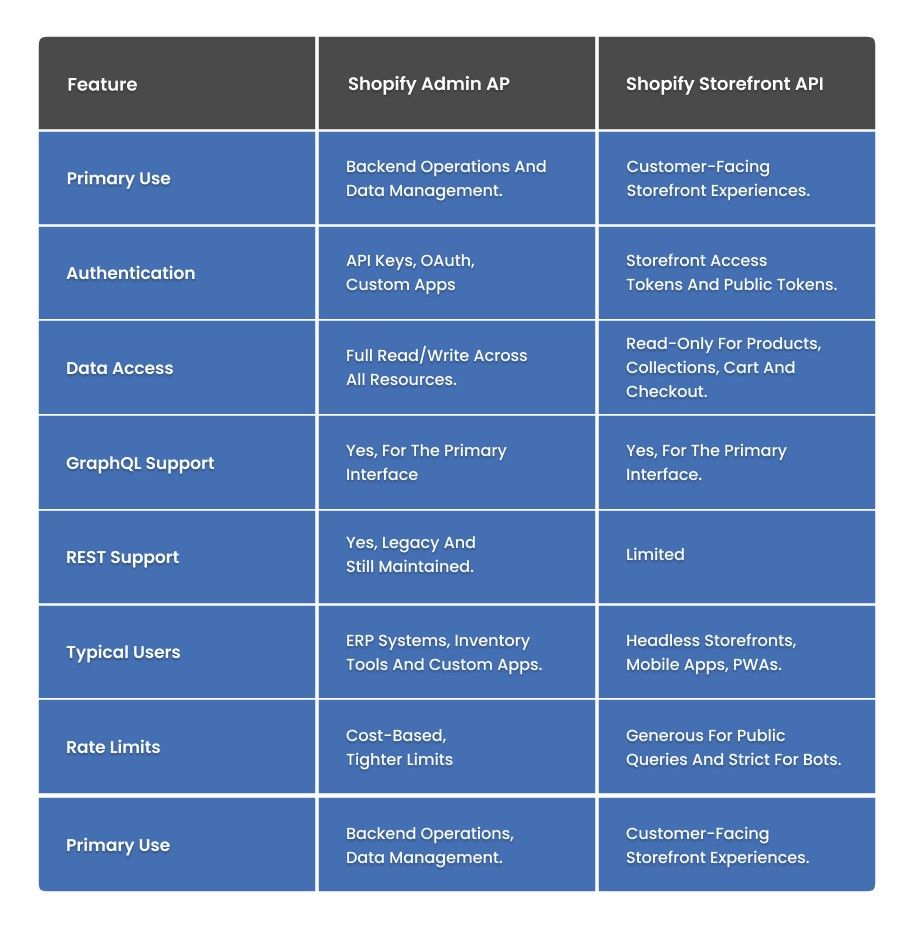
The Shopify Admin API is used for backend operations like creating and managing products, processing orders, handling customers, and syncing inventory. It’s ideal for ERP systems, admin dashboards and internal tools.
The Shopify Storefront API focuses on customer-facing experiences such as headless storefronts, mobile apps, and custom shopping flows. It only exposes safe and read-only data using public tokens.
In practice, both work together. Admin API manages store data, while Storefront API delivers it to customers across different channels
Shopify REST API vs GraphQL API
Shopify’s move toward GraphQL as the primary Admin API reflects a wider industry transition in how modern applications handle data.
In 2026, GraphQL helps reduce API requests by up to 60% in complex data-fetching scenarios, while REST APIs continue to support legacy systems and straightforward, single-resource requests.
Here’s a clear comparison of how both approaches perform within the Shopify ecosystem:
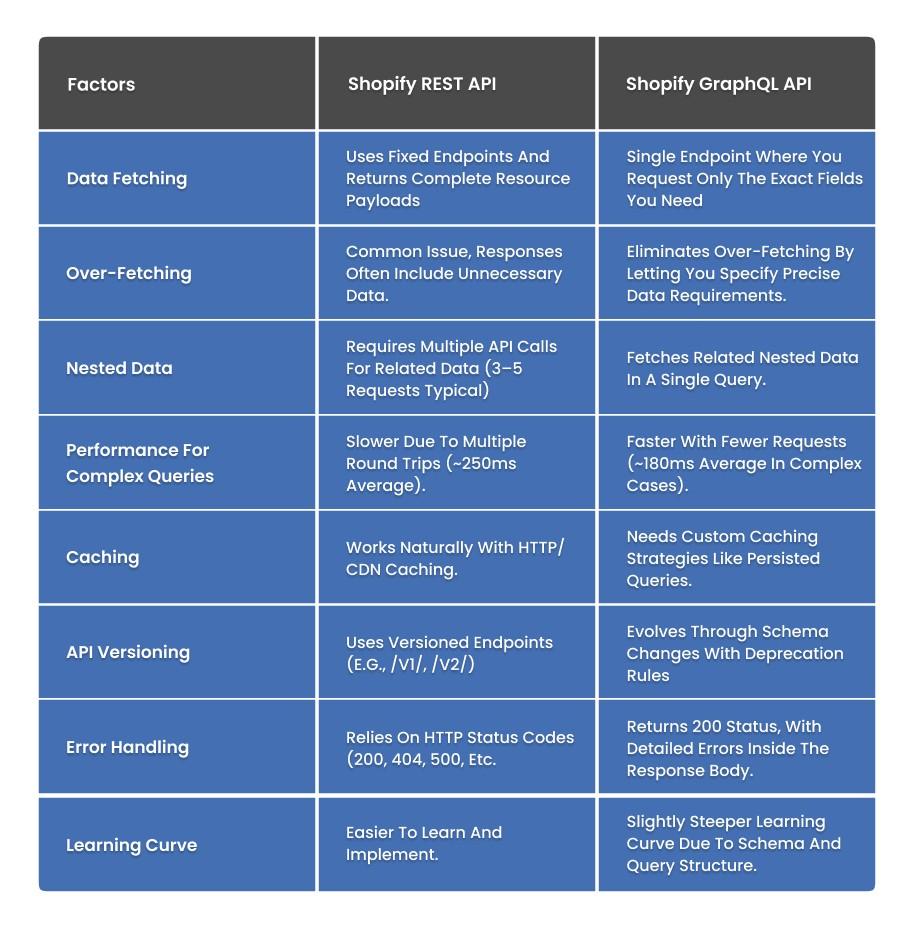
GraphQL works best for ecommerce because product data is structured in multiple related layers.
A product is made up of variants, pricing, regional data, and shipping configurations, and GraphQL handles all of it in one unified request instead of multiple REST calls.
REST works best for simple, high-frequency tasks like order syncing due to low overhead and strong HTTP caching. In 2026, use GraphQL for complex queries and REST for repetitive operations
Shopify Webhooks and Automation
Shopify webhooks automatically notify applications when specific events occur. This removes the need for constant API polling.
Order Creation
Triggers instantly when a customer places an order, enabling real-time processing for inventory updates, payment workflows, and fulfillment automation.
Product Updates
Notifies connected systems whenever product details change, ensuring storefronts, apps, and third-party platforms stay synchronized.
Fulfillment Status
Sends updates when orders are packed, shipped, or delivered to allowing accurate order tracking and customer notifications.
Customer Registration
Enables automatic customer registration tracking to power welcome campaigns and integrated CRM processes.
Inventory Changes
Updates external systems when stock levels change to help prevent overselling and maintain accurate inventory visibility.
Why Webhooks Matter?
Webhooks are important because they deliver real-time event notifications, eliminate constant API polling, optimize system performance, and improve automation scalability. For enterprise ecommerce platforms, they are a core component of reliable, event-driven integrations.
Common Integration Use Cases
ERP Integration
Shopify Plus solutions support seamless ERP integration by connecting platforms like NetSuite and Microsoft Dynamics 365 for automated data synchronization and scalable ecommerce operations.
CRM Integration
CRM integrations like Salesforce, HubSpot, or Klaviyo use Shopify customer data to power marketing and support workflows. The Admin API exports customer profiles, purchase history, and LTV data, while webhooks keep customer segments updated in real time for actions like purchases and cart abandonment.
Inventory Synchronization
Multi-channel sellers use Shopify’s Admin API to keep inventory consistent across platforms like Amazon, eBay and physical POS systems. Real-time webhook updates prevent overselling by instantly syncing stock changes across all sales channels.
Mobile App Integrations
With the Storefront API for product and cart management and the Customer Account API for login, developers can build full mobile shopping experiences aligned with Shopify’s mobile app development approaches.
Headless Commerce
Headless commerce decouples the frontend from Shopify’s backend, allowing developers to use frameworks like React, Next.js, or Vue.
The Storefront API delivers product and collection data, while Shopify handles checkout. This approach offers faster performance and flexible UI design, though it reduces compatibility with theme-based apps and limits checkout customization.
Custom Ecommerce Integrations
When Shopify apps fall short for workflows like ERP synchronization, custom pricing, or loyalty management, businesses rely on custom integrations powered by Shopify APIs. These systems benefit from scalable infrastructure and experienced teams that develop Shopify solutions for reliability over time.
Shopify API Authentication & API Keys
Every Shopify API integration starts with authentication. Shopify supports three primary methods.
Custom Apps (API Keys)
Used for single-store private integrations. API keys are generated from the Shopify Admin and exchanged for an access token to enable internal tools and workflows.
Public Apps (OAuth 2.0)
Standard method for third-party apps. Merchants authorize access via OAuth, and Shopify returns a store-specific access token for secure API use.
Storefront Access Tokens
Used with the Storefront API for customer-facing experiences like browsing products and managing carts without exposing admin credentials.
How to Get Your Shopify API Key?
Create a custom app in Shopify Admin, set required API scopes, install it on your store, and Shopify will generate the access token.
Uses OAuth 2.0 with PKCE for secure headless authentication, replacing multiphases and enabling seamless login, sessions, and modern checkout flows.
Shopify API Pricing & Rate Limits
API access is available across all Shopify plans, though scalability and advanced features vary by subscription level.
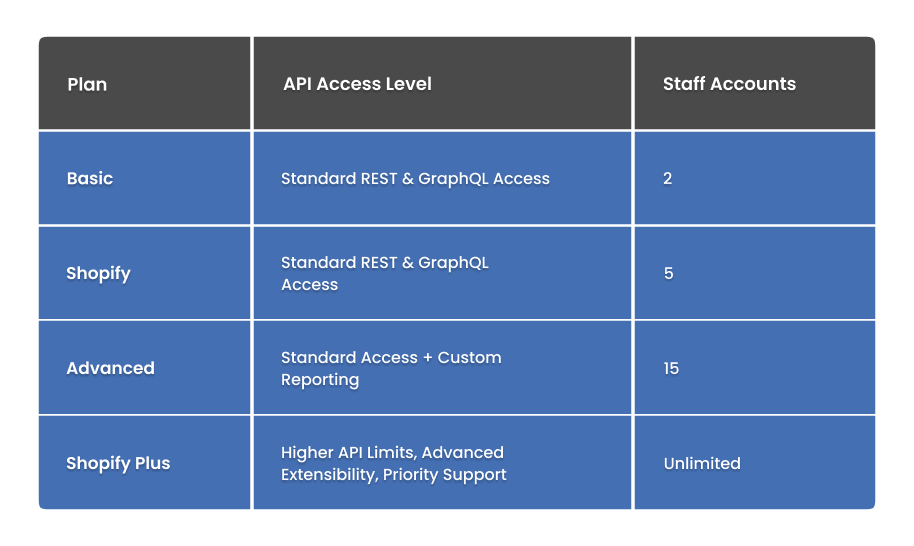
Why Shopify Plus Matters?
Shopify Plus offers significantly expanded API capabilities. It includes higher rate limits, custom checkout extensibility, and automation tools like Shopify Flow. These features make it ideal for high-volume stores that require enterprise-level performance and scalability.
Shopify API Rate Limits in 2026
Shopify controls API usage through rate limits. Simple requests use fewer resources, while larger actions consume more.
However, it also supports high storefront traffic, applies stricter limits to bots, and can queue up to 1,000 requests before rejecting extra calls.
Best Practice for Managing Limits
Use exponential backoff in your retry logic. Instead of retrying instantly after throttling, increase wait times gradually to reduce failed requests and maintain stable API performance.
Step-by-Step Integration Process for Businesses
Building a Shopify API integration requires a clear development workflow to ensure secure data exchange, scalability, and long-term system reliability.
Step 1: Define Requirements
Start by identifying what data needs to sync, which systems are involved, and how often updates should occur. Define the data flow direction and document edge cases such as deleted products, duplicate records, or inventory mismatches to avoid operational issues later.
Step 2: Choose Your API
Select the API based on your integration needs. The GraphQL Admin API is ideal for complex queries and large-scale data handling, while the REST Admin API works well for simpler integrations. For headless commerce or customer-facing experiences, the Storefront API is the preferred choice.
Step 3: Set Up Authentication
Set up authentication using a custom app or OAuth flow depending on the integration type. Request only the required API scopes and store access tokens securely using environment variables or secret management tools to improve security.
Step 4: Build the Integration Layer
Develop a stable integration layer with retry logic, timeout handling, error logging, and API rate limit management. Using Shopify’s official SDKs for Node.js, Ruby, or Python helps simplify development and improve reliability.
Step 5: Implement Webhooks
Use Shopify webhooks to receive instant updates for events like orders, inventory changes, and product updates. This reduces API polling, improves efficiency, and enables faster data synchronization. Always verify webhook signatures for security.
Step 6: Test Thoroughly
Before deployment, test the integration for rate limits, webhook failures, invalid data handling, and synchronization accuracy. Shopify development stores provide a safe environment for testing without affecting live operations.
Step 7: Deploy & Monitor
After deployment, continuously monitor API performance, failed syncs, and webhook activity using logging and alerting tools. Our ongoing monitoring helps maintain stability and ensures the integration scales with business growth.
Security Best Practices for Shopify API Integrations
Security should be a core consideration in every Shopify API integration to protect customer data, maintain platform stability and ensure long-term business reliability.
Use Secure Authentication
Always implement secure authentication methods such as OAuth 2.0 or encrypted access tokens to prevent unauthorized API access.
Encrypt Sensitive Data
Protect customer, payment, and business data using modern encryption standards both in transit and at rest.
Validate Webhooks
Verify Shopify webhook signatures to ensure requests are authentic and protected from malicious activity or spoofing attempts.
Monitor API Activity
Continuously track API requests, failures, and unusual behavior to quickly identify potential security threats or unauthorized access attempts.
Respect API Rate Limits
Avoid excessive polling or poorly optimized requests that may trigger API throttling and impact integration performance.
Implement Role-Based Access Control (RBAC)
Implement role-based access control by granting only the permissions required for the integration. This reduces security risks, limits unnecessary data exposure, and helps prevent operational or compliance issues.
Common Challenges & How to Solve Them
Here are the mentioned challenges and their solutions.
Challenge 1: Rate Limit Throttling
The solution is to use exponential backoff, batch API requests, and replace frequent polling with Shopify webhooks.
Challenge 2 : Data Inconsistency Between Systems
Solution uses Shopify webhooks as the source of truth and idempotent endpoints to safely handle duplicate events.
Challenge 3: Complex GraphQL Query Errors
Test queries in the Shopify GraphQL Explorer, monitor query costs, and split large queries into smaller requests.
Challenge 4: Headless App Compatibility Issues
Auditing apps before going headless and using API-first tools like Klaviyo and Yotpo is a reliable solution for avoiding compatibility issues.
Challenge 5: Checkout Session Expiration
Testing token expiration flows and using proper refresh token rotation is a reliable solution for checkout session expiration issues.
Future Trends in Shopify APIs for Modern Brands
The future of Shopify integrations is becoming more intelligent, flexible, and automation-focused. Key trends shaping modern ecommerce include:
AI-Driven Automation
AI-powered systems are improving inventory management, customer segmentation, and personalized shopping experiences through smarter API workflows.
Headless & Composable Commerce
More businesses are adopting headless architectures and connecting Shopify with specialized tools for greater frontend flexibility and scalability.
Real-Time & Edge Personalization
Edge technologies and event-driven APIs now enable faster personalization and low-latency shopping experiences across devices.
Agentic Commerce
AI shopping assistants and automated buying agents are increasing, driving stronger API authentication and bot management requirements.
Unified API Ecosystems
Companies are managing REST and GraphQL APIs through centralized platforms to simplify integrations and data synchronization.
B2B API Expansion
Shopify’s evolving B2B API capabilities are shaping the future of ecommerce automation. Partner with SolCoders to create scalable Shopify integrations that support innovation and sustainable growth.
Final Thoughts
Shopify API integrations are the foundation of modern ecommerce scalability. Whether you’re automating inventory sync, building a headless storefront, or connecting enterprise systems, a strong API strategy reduces manual work, removes data silos, and improves customer experience.
The key to successful implementation is choosing the right API architecture, securing integrations properly, optimizing performance and building workflows that can scale with business growth.
Whether you are launching a custom ecommerce platform or modernizing enterprise infrastructure, investing in the right Shopify integration strategy can improve operational efficiency, customer experiences and long-term scalability.
SolCoders combines innovation and technology to deliver scalable, high-performance software solutions that streamline operations and accelerate digital transformation
In This Article
Frequently Asked Questions
How do Shopify APIs work?
Shopify APIs allow applications to communicate with Shopify stores securely using authenticated requests. Businesses use APIs to automate operations, synchronize systems, and build custom ecommerce experiences.
What is Shopify's API used for?
Shopify APIs are used for inventory management, ERP integration, CRM synchronization, mobile app development, headless commerce, and ecommerce automation.
How to set up and handle Shopify webhooks?
Register a webhook endpoint, verify HMAC-SHA256 signatures, respond within 5 seconds, and process data asynchronously with retry handling. These webhooks automate workflows such as order processing and inventory updates.
How to access Shopify API?
SolCoders expert developers leverage Shopify APIs by setting up Shopify apps, generating secure API access, and building authenticated integrations tailored to business needs.
What is the best API for ecommerce?
The best eCommerce API depends on business requirements. The Shopify GraphQL API is widely preferred for its scalability, performance, and alignment with modern eCommerce architecture.
Are Shopify APIs free?
Most Shopify APIs are included with Shopify plans, although custom integrations and enterprise development may involve additional costs.
Related Blogs
Latest Blogs

Shopify B2B Wholesale: Complete Setup Guide, Features & How It Works
Blogs Software Development Shopify B2B Wholesale: Complete Setup Guide, Features & How It Works Shopify…

Shopify Functions Guide: Custom Discounts, Delivery and Payment Rules
Blogs E-commerce Development Shopify Functions Guide: Custom Discounts, Delivery and Payment Rules Shopify Functions Guide:…

Enterprise Application Integration: How it Transform Businesses
Blogs Software Development Enterprise Application Integration: How It Transforms Businesses Enterprise Application Integration: How It…